
A simple event has a title, date and description, but no online ticket sales. Use it for sponsored walks, AGMs, parents' meetings, summer fetes with cash-on-the-door, or anything you want to publish without selling tickets through Jotterly.
To create one, go to Events in your admin sidebar, click New event, choose Simple event, and fill in the details.
Steps
- From your admin dashboard, click Events in the sidebar.
- Click + New event in the top right.
- Choose Simple event. The other options are Ticketed event, for selling tickets online, and Start from a template, which fills in an event for you.
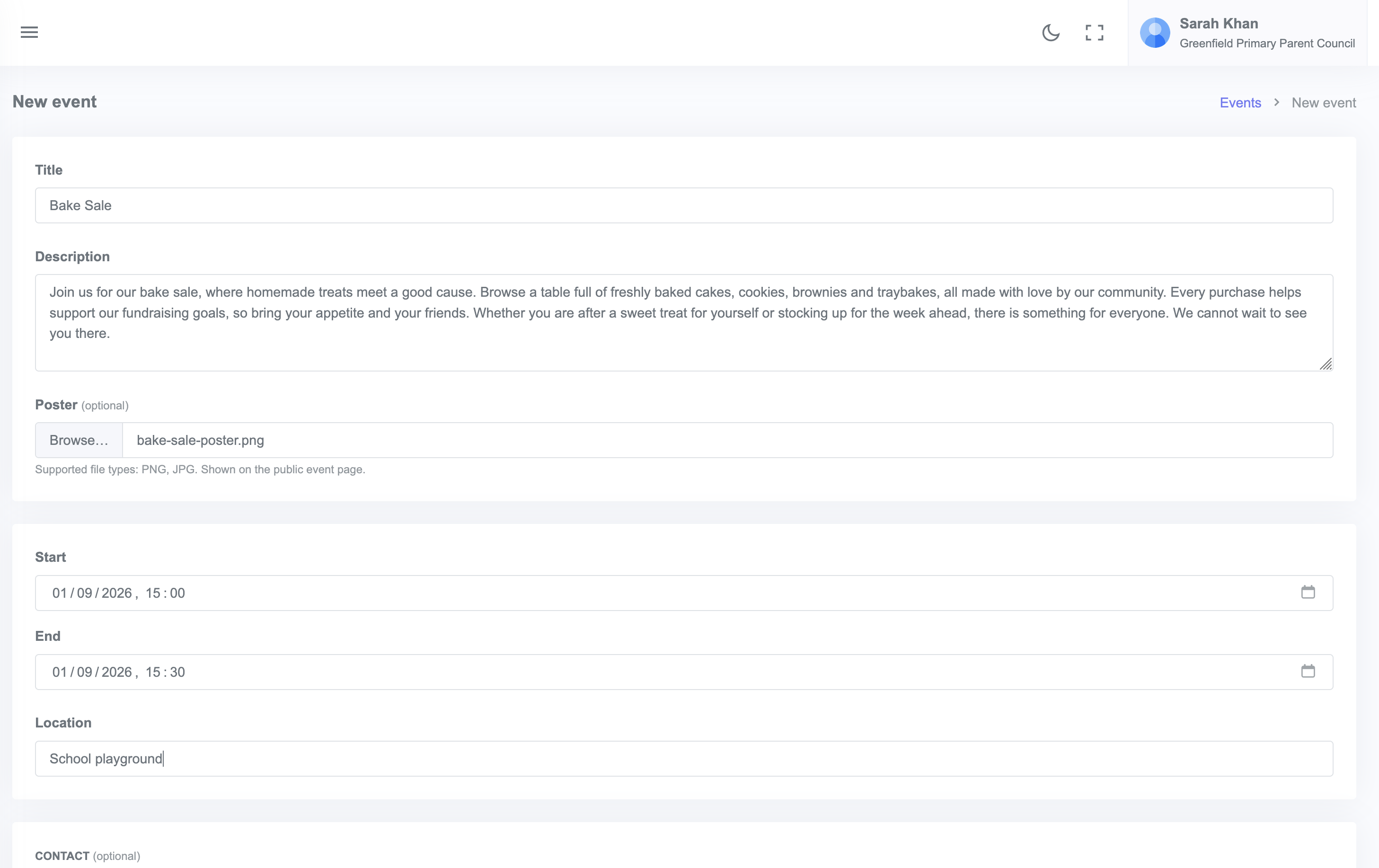
- Fill in:
- Title (for example, "Sponsored Walk along the canal")
- Date and time (start and optional end)
- Location
- Description, at least 50 characters so supporters know what to expect
- Visibility: Public or members only
- Click Save.
The event is now live on its own page and listed on your community page. You can copy the link to share anywhere.
When to use a simple event
- Sponsored events where contributions come in via the linked fundraiser, not at the door
- AGMs and committee meetings
- Free community events where you want a public page to share but do not need ticket sales
- Cash-and-card-only events where a SumUp till at the door makes more sense than online tickets
Want to take card payments at the door?
A simple event can still be linked to a fundraiser, and supporters can donate via the fundraiser link before or after. If you want full online ticket sales, create a ticketed event instead.